Amazon A+ Studio Firefox Extension Download – Amazon Listing Analysis & A+ Content Tool
Amazon A+ Studio Firefox extension download for Amazon sellers and ecommerce teams. Capture a supported Amazon listing, analyze buyer-facing evidence, plan A+ Content modules, prepare image prompts, and check claim safety and mobile readability in one workflow.
What is Amazon A+ Studio for Firefox?
Amazon A+ Studio is a Firefox Manifest V3 extension that turns an Amazon product page into an evidence-led A+ Content production workspace. It captures product facts, gallery images, bullets, and visible A+ modules on supported marketplaces. The extension is an independent tool and is not affiliated with Amazon.
Main features
- Listing and ASIN capture: detect the current Amazon marketplace and collect the page information needed for analysis.
- Buyer-decision analysis: identify buyer questions, visible proof, claims, persuasion gaps, and content opportunities.
- Visual DNA and competitor research: organize references for composition, color, typography, and photography direction while avoiding brand imitation.
- A+ storyboard planning: progress through Overview, Competitors, Visual DNA, Modules, Storyboard, Prompt Studio, Assets, and QA.
- AI image generation workflow: use your own OpenAI or OpenAI-compatible provider for approved image-generation and editing briefs.
- Safety checks: flag unsupported claims, product drift, and mobile readability issues before export.
- Local settings: provider settings and optional task data are stored in Firefox extension storage; API keys are masked and excluded from exports and logs.
Download details
- Package:
Amazon-A-Plus-Studio-firefox-0.1.0.zip - Version: 0.1.0
- File size: 149,338 bytes
- SHA-256:
474C082AAB48FF401C2AE1AA8C6DF441A17E07416A88E356E10BCDBFB45B7BAD - Supported browser: Mozilla Firefox 109 or later with Manifest V3 support
How to install the Firefox extension
- Download the ZIP package and extract it to a local folder.
- Open
about:debugging#/runtime/this-firefoxin Firefox. - Click Load Temporary Add-on….
- Select the extracted
manifest.jsonfile. - Open the A+ Studio toolbar button or popup. Firefox temporary add-ons remain installed until Firefox is restarted.
This ZIP is an unpacked-development build. Firefox loads it through “Load Temporary Add-on…”, not by selecting the ZIP file itself.
How to use Amazon A+ Studio in Firefox
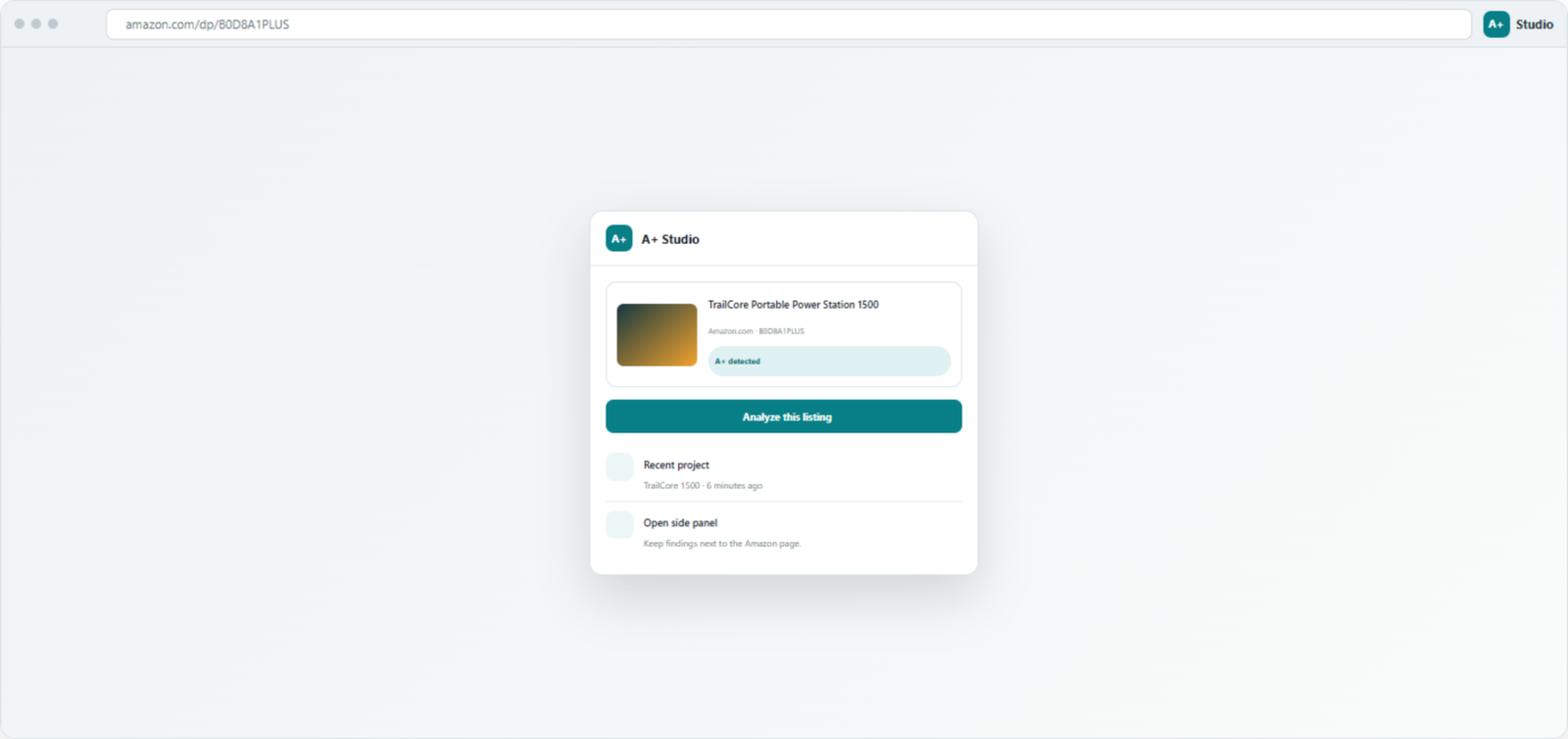
- Open a supported Amazon product-detail page and click the A+ Studio toolbar button.
- Check the detected marketplace and ASIN, then choose Analyze this listing.
- Review captured product facts, images, bullets, visible A+ modules, claims, and quick findings.
- Move through Overview → Competitors → Visual DNA → Modules → Storyboard to build a buyer-decision sequence.
- In Prompt Studio, approve a scene brief and select an image model and output settings.
- Organize outputs in Assets and run QA for claim safety, product consistency, and mobile readability.
- Export after all critical warnings are resolved.
Connect an AI provider
- Open the extension workspace and go to AI settings.
- Enter an OpenAI base URL, API key, and GPT-4o model, or add an OpenAI-compatible base URL and API key.
- Save the provider settings and test the connection.
- Select an available image-capable model in Prompt Studio.
Prompts, reference images, and generation parameters go directly to the provider endpoint you configure. Provider pricing, availability, model behavior, and data retention are controlled by that provider.
Troubleshooting
Firefox removes the extension after restart
That is expected for a temporary add-on. Load the manifest.json again from about:debugging#/runtime/this-firefox after restarting Firefox. A signed, permanent distribution requires a Firefox Add-ons package.
The extension cannot read the Amazon page
Use a supported Amazon marketplace, reload the product page after loading the add-on, and confirm that the extension is enabled. The page must contain a normal product-detail layout for capture.
AI analysis or image generation fails
Verify the base URL, API key, model access, and provider endpoint. Select a model that supports the requested operation and use supported image dimensions.
Privacy and safe use
Website content, prompts, and reference images may be sent to the AI provider you configure. Review the provider’s privacy policy before sending confidential information. Keep API keys private and do not include them in screenshots or public posts. For the broader process, see the Amazon A+ Studio user guide.
SEO keywords
Amazon A+ Studio Firefox extension download, Firefox extension for Amazon sellers, Amazon listing analysis Firefox, Amazon A+ Content tool, Amazon product page analyzer, A+ Content workflow, ecommerce listing research extension, Firefox Manifest V3 extension.